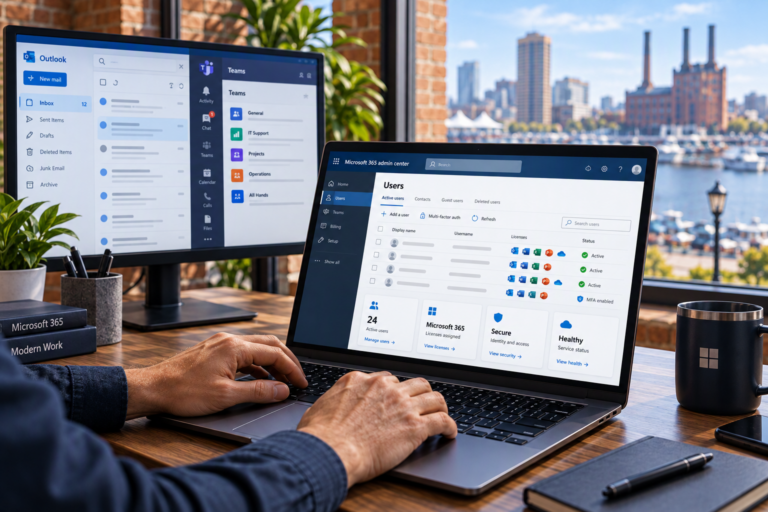
Business Email Setup in Baltimore, MD gives your organization a professional way to communicate using its own domain name. SyncTek Solutions helps small businesses and home offices configure Microsoft 365 email, organize mailboxes, and establish practical security settings so employees can work with greater confidence.
A reliable email setup involves more than creating an address. Your domain must direct messages to the correct service, users need appropriate access, and sending systems should be configured to help receiving providers recognize legitimate mail.
Business Email Setup in Baltimore, MD
Business email typically uses your companys domain rather than a personal email providers address. This creates a consistent identity for customer communication and gives your organization more control over accounts as employees join, change roles, or leave.
SyncTek Solutions provides business email configuration through its Microsoft 365 services. Assistance may include tenant setup, domain verification, mailbox creation, security configuration, and troubleshooting. The final scope depends on whether you are starting fresh or replacing an existing email system.
Who Needs Professional Email Setup?
This service is helpful for new businesses establishing their first company addresses, self-employed professionals separating personal and business communication, and growing teams that need consistent account management.
It can also address situations where email was configured informally and now causes problems. Examples include messages arriving inconsistently, employees sharing passwords, or uncertainty about who controls the domain and administrative account.
For a Baltimore County office or a home-based business in Dundalk, the objective is the same: an email environment that is understandable, organized, and easier to support.
What Your Email Setup May Include
Domain and DNS configuration
Your domain is the name used in your email addresses. DNS, or Domain Name System, contains records that tell internet services where to direct traffic. Email-specific DNS records help route incoming messages and identify authorized sending systems.
SyncTek Solutions can help configure those records while considering existing website and email services. DNS changes should be planned carefully so an email improvement does not unintentionally disrupt another business tool.
User mailboxes and shared addresses
Employees generally need individual accounts for clear ownership and access management. Shared mailboxes can support team-managed addresses, such as a general inquiry mailbox, without making a shared password the default workflow. Licensing and access requirements should be checked for the intended use.
Email authentication
SPF identifies permitted senders for your domain. DKIM adds a digital signature to outgoing messages. DMARC tells receiving systems how to evaluate authentication results and handle messages that fail relevant checks.
These settings help reduce domain impersonation and support legitimate delivery, but they do not guarantee inbox placement or prevent every fraudulent message. Other sending tools, including website forms and marketing platforms, need consideration during configuration.
Account protection and device access
Setup may include Multi-Factor Authentication, administrative account review, and assistance connecting supported email applications. The goal is to make everyday access practical while reducing reliance on passwords alone. Available security controls depend on the selected subscription.
How the Setup Process Works
Discovery: Identify your domain provider, current email service, users, shared addresses, devices, and business requirements. Confirm who can authorize changes and provide administrative access.
Planning: Choose an appropriate account structure and confirm licensing requirements. If existing messages need to move, email migration should be included as a separate planning consideration rather than assumed to happen automatically.
Configuration: Create the agreed accounts, update necessary DNS records, and apply appropriate security settings. Changes to an active email system should be coordinated around business needs.
Testing and handoff: Check sending, receiving, sign-in, and access to shared resources. Explain the essential steps employees need for daily use and identify where to request help.
Why Choose SyncTek Solutions?
SyncTek Solutions offers personalized Baltimore-area support for businesses without internal IT staff. Recommendations are explained in plain language and focus on the tools your organization actually needs.
Professional setup also provides a stronger foundation for ongoing Exchange Online management, user onboarding, and Microsoft 365 security. Backup planning is another consideration: account protection helps reduce unauthorized access, while a backup provides another recoverable copy of important information.
FAQs
Can we keep our existing domain?
In many cases, yes. Setup requires access to the appropriate domain and DNS administration. Existing services should be reviewed before records are changed.
Will our old email automatically appear?
No. Creating new mailboxes and routing new messages does not automatically transfer existing mail. A migration plan is needed when historical messages or other supported information must move.
Can you help after setup?
SyncTek Solutions provides Microsoft 365 administration and email troubleshooting. Standard phone and email technical support is available Monday through Friday, 9:00 AM to 6:00 PM Eastern Time.
Get Your Business Email Set Up
Call 410-368-0084 or contact support@syncteksolutions.com to discuss business email setup. SyncTek Solutions can help define the requirements, explain the work involved, and guide your next steps.